How Visionary Image Works
Visionary Image renders your images with built-in Blurhash placeholders, using three layers to provide the fastest possible placeholder rendering, improving performance, user experience, and Core Web Vitals. Powered by Blurhash URLs, which embed image placeholder data directly in the URL.
- 01. Base layer / Background color representing the average pixel color of the image. This layer is rendered true-to-size using the aspect ratio and max-width data embedded in Blurhash URLs.
- 02. Blur layer / A Blurhash placeholder is painted on a canvas; this layer provides a blurred preview of the image, giving users an idea of its content while the image loads.
- 03. Image layer / The image loads and is rendered on the top layer, replacing the blur layer.
Three-stage image loading
Blurhash URLs contain embedded placeholder data to supercharge image loading and boost Core Web Vitals. Create your own Blurhash URL by uploading an image or providing a publicly accessible image URL.
Visionary Image in Action: PageSpeed Filmstrip
This PageSpeed Insights filmstrip shows how Visionary Image loads gracefully on a throttled connection.
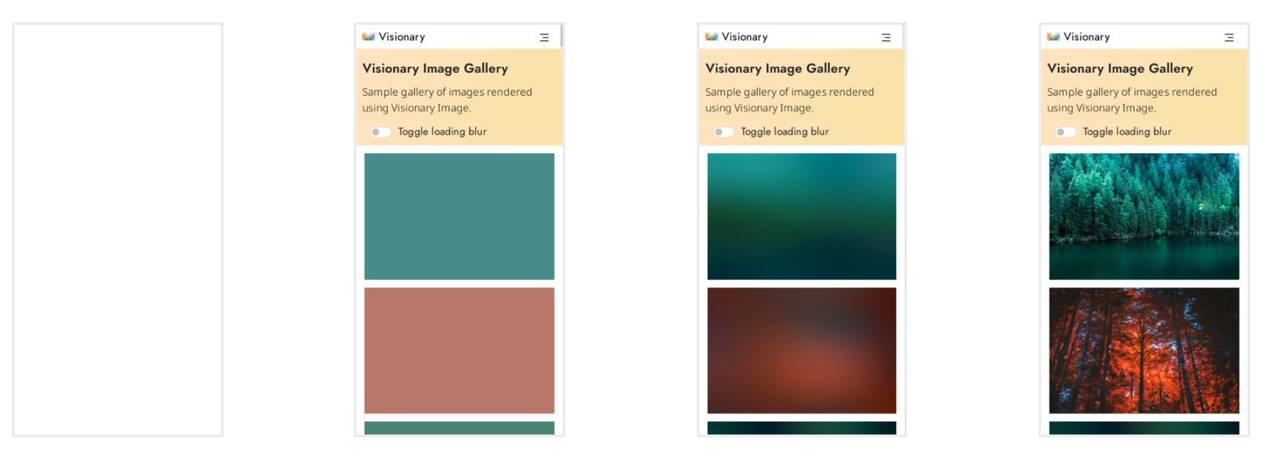
- Page load begins
- True-to-size base layer renders instantly (preventing layout shifts)
- Blurhash placeholders paint
- Full images load
How it Works
Visionary Image renders three layers to provide the fastest possible placeholder rendering, improving Core Web Vitals like Cumulative Layout Shift (CLS). Blurhash URLs embed placeholder data directly in the image URL.

Decoded Blurhash URL

Blurhash in 60 seconds
Install Visionary Image in your project:
pnpm add visionary-imageImport and render the component:
import { Image } from 'visionary-image';

const ImageDetailPage = ({ imageUrl }) => (
  <Image src={imageUrl} alt="Field full of white cherry blossoms" />
);
Create a Blurhash URL
Convert a public image URL with Blurhash URL Maker
Generate from a local image with Drag-and-Drop Image to Blurhash
Generate programmatically using blurhash-url